

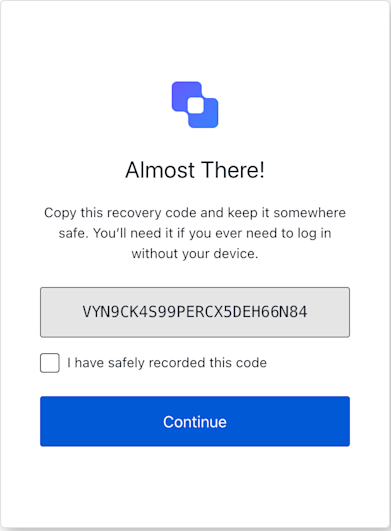
mfa-recovery-code-challenge-new-code screen. This screen displays the MFA recovery code for safe keeping.
Constructors
Create an instance of MfaRecoveryCodeChallengeNewCode screenExample
Properties
Provides branding-related configurations, such as branding theme and settings.
Provides client-related configurations, such as
id, name, and logoUrl.Provides information about the user’s organization, such as organization
id and name.Contains data about the current prompt in the authentication flow.
Contains details specific to the `mfa-recovery-code-challenge-new-code“ screen, including its configuration and context.
Contains data related to the tenant, such as
id and associated metadata.Provides transaction-specific data, such as active identifiers and flow states.
Handles untrusted data passed to the SDK, such as user input during login.
Details of the active user, including
username, email, and roles.Methods
This method confirms that the user has saved the new recovery code and continues the authentication flow.
This method sends a POST request to the
/u/mfa-recovery-code-challenge-new-code endpoint with the required state, action, and saved parameters.A promise that resolves when the confirmation is successfully submitted. On success, the browser will typically be redirected to the next step.Throws an error if the form submission fails (e.g., network issue, invalid state, or if the server responds with a 400 error like ‘no-confirmation’).Example
Optional custom data to include with the request form body.